How to Build a Webhook Inside a Bitrix24 Workflow Without an External Server

Why a workflow, not a script
- No infrastructure. No VPS, updates, certificates or separate security to manage.
- Visible to everyone. The workflow is shown in the record, and every step is written to the log.
- Editable without a developer. The logic can be changed in the visual designer.
- Permissions are inherited from Bitrix24. Field access is checked by the system.
There’s a limitation too: complex algorithms are hard to read in a workflow, and debugging is slower than in code.
Anatomy of the URL
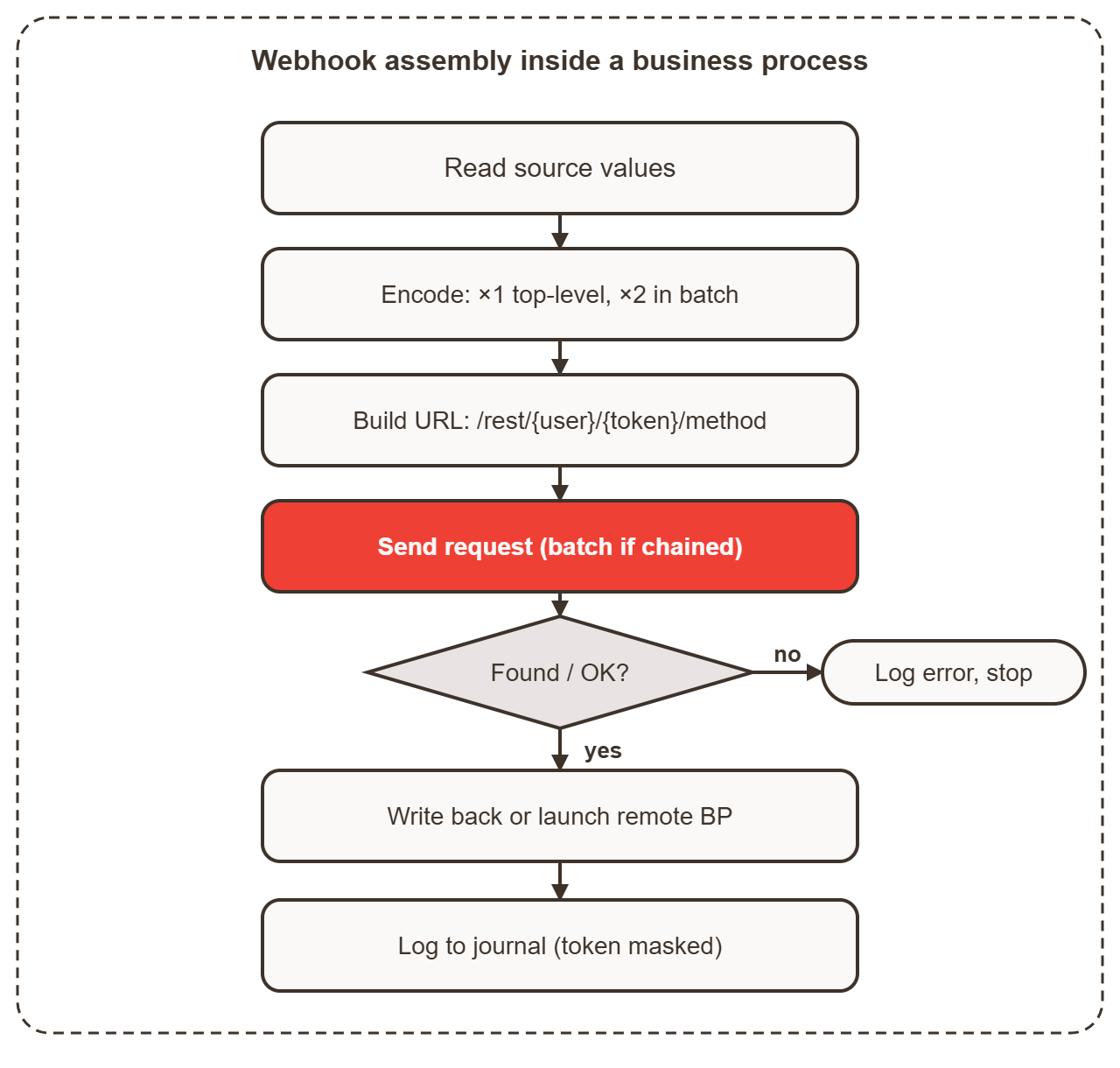
A webhook URL is assembled from parts:
{PORTAL_URL}/rest/{USER_ID}/{WEBHOOK_TOKEN}/{METHOD}.json?{PARAMETERS}In a workflow, the parts are filled in from constants, variables and document fields:
{=Constant:portal_url}/rest/{=Constant:user_id}/{=Constant:token}/batch.json?halt=1&cmd[lead]=crm.lead.list?filter[TITLE]={=Document:TITLE}%26SELECT[0]=ID{=Constant:...}— a workflow constant.{=Variable:...}— a variable filled in earlier.{=Document:...}— a field of the current lead.%26— an encoded ampersand inside a command.
Encoding: the key rule
A value is encoded once if it sits directly in the parameters of the top-level request. A value is encoded twice if it goes inside a batch cmd[...].
Example with the phone number +79001234567:
| Stage | Result |
|---|---|
| Original value | +79001234567 |
Encoded once (urlencode) | %2B79001234567 |
| Encoded twice (needed inside batch) | %252B79001234567 |
Without the second encoding, the plus sign is decoded into a space, and the number isn’t found. A value containing an ampersand breaks the same way: it splits the parameters.
This can be done with two actions in a row, each taking the result of the previous one:
urlencoded_str = urlencode({Template:phone})
urlencoded_str = urlencode({Variable:urlencoded_str})
The reason: the parameter is nested inside the batch and gets decoded twice.
Batch chains: search and launch
A batch lets you chain calls where each one uses the result of the previous one. This is how searching for a lead on another portal and launching a workflow there works:
{PORTAL_URL}/rest/{USER_ID}/{WEBHOOK_TOKEN}/batch.json?halt=1
  &cmd[remote_lead]=crm.lead.list?filter[TITLE]={INN_ENCODED}%26filter[SOURCE_ID]={SOURCE_ID}%26SELECT[0]=ID
  &cmd[check_lead]=crm.lead.get?ID=$result[remote_lead][0][ID]
  &cmd[start_bizproc]=bizproc.workflow.start?TEMPLATE_ID={TEMPLATE_ID}%26DOCUMENT_ID[0]=crm%26DOCUMENT_ID[1]=CCrmDocumentLead%26DOCUMENT_ID[2]=$result[remote_lead][0][ID]%26PARAMETERS[ORIGIN_LEAD_ID]={LEAD_ID}
What matters here:
$result[remote_lead][0][ID]— the ID of the lead found by the first command.SELECT[0]=ID— only the ID is returned, not the whole record. This keeps the response small.halt=1— the batch stops on error. That’s the right behavior for a search: if no lead is found, there’s no point launching the workflow.%26insidecmd[...]separates the command’s parameters.
In this example, {INN_ENCODED} is the company’s tax ID (INN), stored in the lead title.
Launching a workflow on another portal without a batch
If there’s only one call, it can be sent directly. In that case, single encoding is enough:
{PORTAL_URL}/rest/{USER_ID}/{WEBHOOK_TOKEN}/bizproc.workflow.start?TEMPLATE_ID={TEMPLATE_ID}&DOCUMENT_ID[0]=crm&DOCUMENT_ID[1]=CCrmDocumentLead&DOCUMENT_ID[2]={LEAD_ID}&PARAMETERS[email]={EMAIL_ENCODED}Requirements:
- The workflow on the remote portal must exist and be accessible to the calling user.
TEMPLATE_IDis different on every portal, so you can’t simply copy it: you need to specify the exact value for each specific Bitrix24 portal.
Writing multiple values to a record
Phones, emails and websites in Bitrix24 are multi-value fields. To add a new value first without overwriting the old ones, the workflow builds commands like this:
crm.lead.update?ID={LEAD_ID}%26fields[PHONE][0][VALUE]={double encoded}%26fields[PHONE][0][VALUE_TYPE]={type}How the workflow handles it:
- Iterate over the existing values in a ForEach loop.
- Accumulate an index for each value (
var1,var2) so positions don’t get mixed up. - Build separate commands: deleting old values by ID and adding new ones.
- Send everything in a single batch with
halt=0. When writing, it’s better to keep a partial result than to stop halfway.
Debugging
- Test on a single lead. Don’t run the workflow on the whole database.
- Write the assembled URL to the log, but mask the token. Otherwise the log becomes an access leak.
- Test encoding on tricky values: with a plus sign, a space, an ampersand, quotes.
- Save the portal’s response to a variable or comment, or you won’t know what came back.
Security
- The token in constants is visible to anyone who can edit the workflow. Limit who can edit it.
- Create the webhook under a technical user, with the minimum set of methods.
- If the token ends up in a log, chat or screenshot, regenerate it and update the constants.
Idempotency
A workflow can run more than once: when the lead changes, on a manual restart or after a failure. Without protection, data gets duplicated. A simple safeguard is an “Already run?” flag field: the workflow checks it at the start and sets it at the end.
What isn’t obvious
- Double encoding and
%26inside a batch. Without them, the request silently returns the wrong thing. $result[...]chains and partial success of a batch.- Comparing values in different formats: a phone with and without the country code, an email in different letter case, a website with and without a trailing slash.
- Several portals working at once with different permissions and versions.
It all seems clear until you run into a specific task.
If you need this for your task
We build chains like this for specific portals (Lead Enrichment Across Bitrix24 Portals with Workflows): from analyzing your processes to a finished workflow with tests, logging and an admin guide. If you need to sync several portals without an external server, tell us about your task and we’ll estimate the scope of work.