
Not All at Once: 7 Ways to Spread Bulk Email in Bitrix24 Across Time and Mailboxes
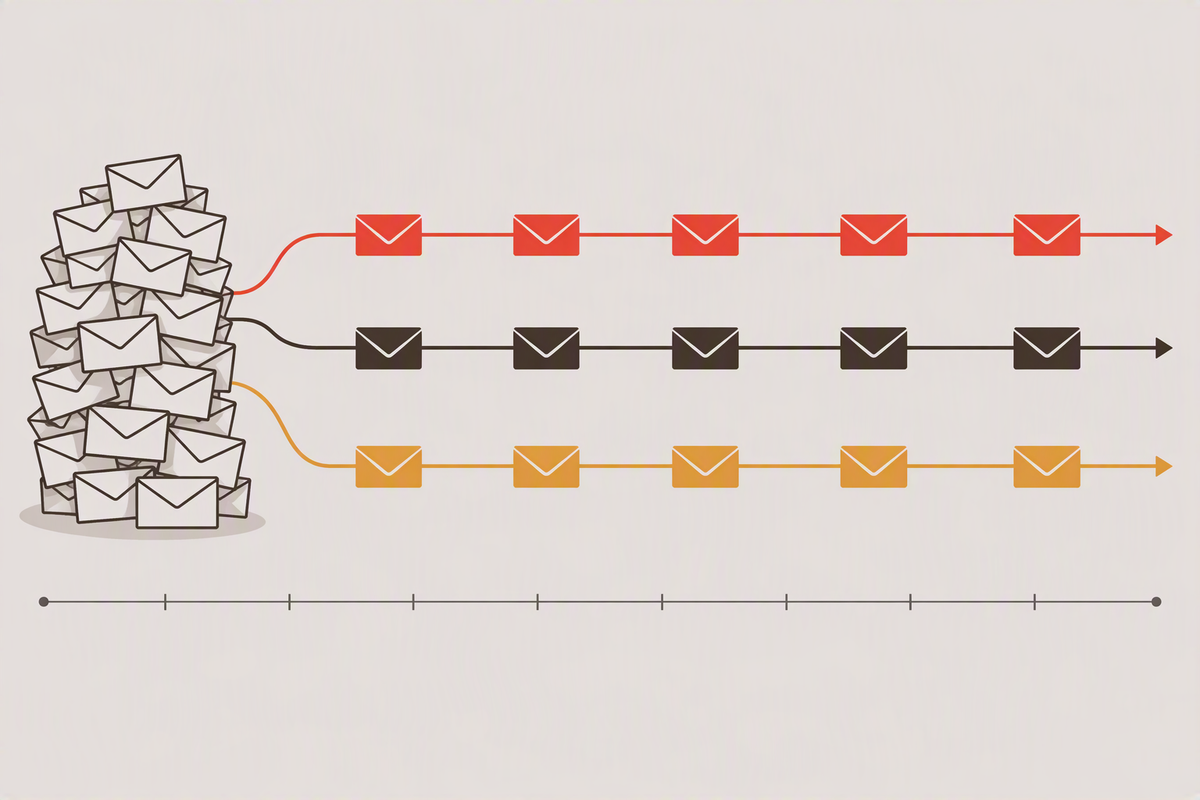
A manager selects a thousand leads in a list, moves them to a pipeline stage, and a workflow starts sending emails. Without any precautions, all thousand emails go out almost simultaneously and from a single address. To a mail service, that looks like a bulk mailing: sending limits kick in, emails get delayed or land in spam, and the address's reputation takes a long-lasting hit.
The solution is to spread the sending out: over time, so emails go out in small portions, and across several mailboxes, so none of them hits its limits. But Bitrix24 workflows have a peculiarity that makes this less trivial than it sounds.
Why it's not as simple as it seems
When leads are moved to a stage in bulk, Bitrix24 doesn't start one workflow, but a thousand independent copies. There's no shared queue between them: each copy knows nothing about its neighbors. So the distribution can't be "handed out from above". Each lead has to work out for itself which minute to go out in and from which address.
We covered how to schedule sending around time zones and weekends in detail in Time-Zone-Aware Email Sending in Bitrix24. That article also describes the "slot" mechanism: each lead's send time gets an offset of 0…N minutes, where N is the sending window. Here, we'll focus on how that offset and the choice of mailbox can be calculated. There are more ways to do it than you might think.
There's also a limitation that applies to every method below: in cloud Bitrix24, a paused workflow doesn't wake up at the exact minute, but on the next pass of the scheduler, which in practice runs every 5–10 minutes. So any per-minute calculation ends up as small batches of emails a few minutes apart. The batch size is controlled by the width of the window.
The methods fall naturally into three groups: mathematical, business-driven and limit-aware.
Mathematical methods
1. Remainder of the lead ID
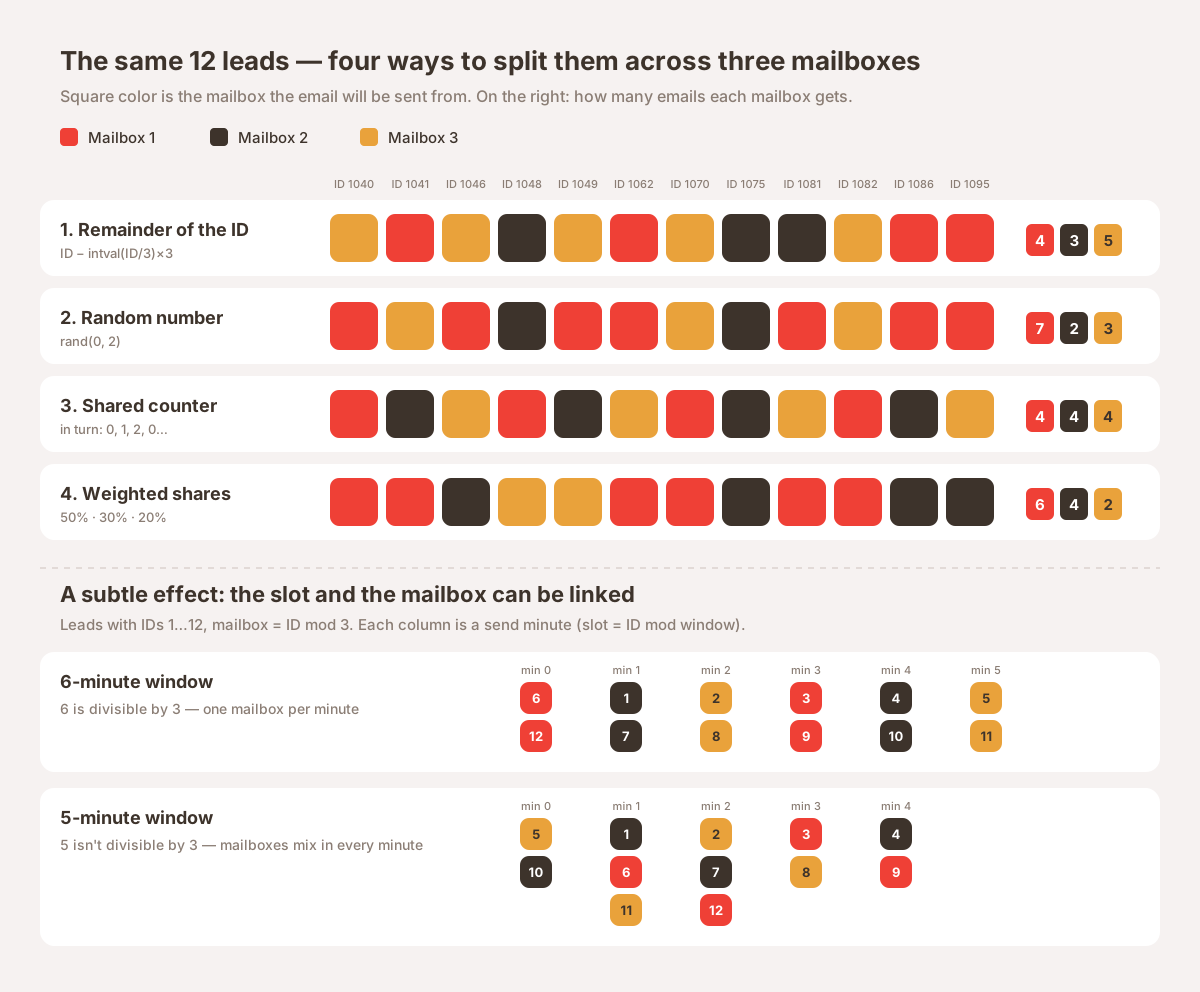
Each lead takes its ID and divides it by the number of mailboxes or by the window size. The remainder is the mailbox or minute number.
Mailbox = ID − intval(ID / 3) × 3          // 0, 1 or 2
Slot    = ID − intval(ID / Window) × Window  // 0 … Window−1
Pros. Simple, nothing to store, predictable. A given lead always lands in the same slot and on the same mailbox, which is easy to check in advance, even in a spreadsheet.
Cons. The distribution is even "on average", not perfectly. Skew appears when a pattern in the selected IDs matches the divisor. For example, if only even IDs were selected and there are two mailboxes, every email goes out from the same one.
When to choose it. In most cases. It's a good default.
2. Random number
Instead of a remainder, each lead gets a random mailbox or minute number.
Mailbox = rand(0, 2)Pros. Independent of any patterns in the IDs.
Cons. The result isn't reproducible: on a re-run, the lead goes out from a different mailbox, and you can't check in advance who goes where. On small batches, the skew is bigger than you'd expect: 30 leads across three mailboxes can easily split as 6 / 10 / 14.
When to choose it. When the selected lead IDs look suspiciously "regular" and reproducibility doesn't matter.
3. Shared counter (strict queue)
A global variable is set up, and each copy of the workflow increments it by one. The mailbox number is the counter's remainder after division by the number of mailboxes; the slot number is the counter divided by the sending rate.
Counter = Counter + 1
Mailbox = Counter − intval(Counter / 3) × 3
Slot    = intval(Counter / Rate)
Pros. The distribution is perfectly even: every mailbox and every minute gets the same number of emails. The rate can be set precisely, although because of the cloud scheduler, emails still go out in batches every few minutes.
Cons. When copies start simultaneously, some of them read the same counter value and get the same number. The counter has to be reset before every mailing. And it's one more thing to keep an eye on.
When to choose it. When a precise rate matters more than simplicity, and batches aren't launched in very large portions at once.
4. Weighted shares
The same ID remainder, but the ranges are split unequally. For example, the remainder after division by 10: 0–4 → mailbox 1 (50%), 5–7 → mailbox 2 (30%), 8–9 → mailbox 3 (20%).
Remainder = ID − intval(ID / 10) × 10
Mailbox 1 if Remainder ≤ 4
Mailbox 2 if Remainder ≤ 7
otherwise Mailbox 3
Pros. Takes into account that mailboxes aren't equal: one has a higher limit, another is new and needs to be "warmed up" with a small volume. The shares are easy to move into settings, for example a universal List, and change without editing the workflow.
Cons. The same as for the ID remainder, plus the shares need to be reviewed from time to time.
When to choose it. When mailboxes have different limits, or you're gradually bringing a new address into use.
Business-driven methods
5. Sticky sender per client
The mailbox number is calculated not from the lead ID, but from the company or contact ID.
Mailbox = Company_ID − intval(Company_ID / 3) × 3Pros. From one mailing to the next, a company receives emails from the same sender, even if it has several leads. That's more natural for correspondence and better for deliverability: the recipient already knows the address, and filters trust it more.
Cons. If a lead has no company filled in, you need a fallback, such as the remainder of the lead's own ID.
When to choose it. When the mailing is followed by real correspondence and it matters that the client deals with one address.
6. By rules rather than math
The mailbox is chosen by a lead attribute: region or time zone, industry, source. For example, eastern regions get one mailbox, western regions another.
Pros. The distribution gains business meaning: for instance, each manager has their own region, and emails go out in their name.
Cons. The load is uneven: it mirrors the structure of your database. If 70% of your clients are in one region, their mailbox gets 70% of the emails.
When to choose it. When the sender matters to the client more than an even load does.
Limit-aware method
7. Mailbox limit control
Each mailbox has a counter of emails sent today and a daily limit, for example in a List item. Before sending, the workflow checks the counter. If the limit is used up, the email goes out from the next mailbox or is moved to the next day.
Pros. This is the only method that accounts for limits directly, rather than relying on "we won't exceed them on average".
Cons. The hardest to implement. It inherits the simultaneous counter-read problem from method 3, so a limit can be slightly exceeded when many copies start at once. The risk drops sharply but doesn't disappear entirely.
When to choose it. Only if you're actually hitting limits and getting blocked. Otherwise, it's unnecessary complexity.
A subtle effect: the slot and the mailbox can be linked
Say you use the ID remainder for both the slot and the mailbox: a 210-minute window and three mailboxes. Emails are spread over time and split between mailboxes, and everything works.
But 210 is divisible by 3, so the minute number uniquely determines the mailbox: in minute 0, emails go out only from mailbox 1, in minute 1 only from mailbox 2, and so on in a cycle.
Usually this barely affects the result: the cloud scheduler wakes workflows in batches every few minutes, and every batch includes all the mailboxes. But it's worth knowing about this link in three cases: when you're reading the mailing log and see only one address active in each minute; when a mailbox has a limit over a short time span; and when you change the window or the number of mailboxes and the distribution suddenly shifts.
If you don't want the link, there are two simple fixes:
- choose a window that isn't divisible by the number of mailboxes, for example 200 or 211 minutes with three mailboxes;
- calculate the mailbox from a different part of the ID, from the result of dividing it by the window:
Mailbox = intval(ID / Window) − intval(ID / Window / 3) × 3Summary: what to choose when
| Method | When to choose it |
|---|---|
| ID remainder | By default: simple, predictable, even enough |
| Random number | Selected lead IDs follow a pattern, reproducibility isn't needed |
| Shared counter | You need a precise sending rate |
| Weighted shares | Mailboxes with different limits, or warming up a new address |
| Sticky sender | The mailing is followed by correspondence, a consistent sender matters |
| By rules | The sender matters to the client: region, manager, industry |
| Limit control | You're actually getting blocked by the mail service |
In short: start with the ID remainder. Need a consistent sender — switch to the company-based sticky sender. Hitting limits — add weighted shares from settings. Limit control only makes sense once everything else has stopped helping.
Not sure which method suits your workflow? Get in touch — we'll review your current workflow and suggest a solution using standard Bitrix24 tools. Learn more about how we automate processes on our Development & Automation page.