Lead Enrichment Across Bitrix24 Portals with Workflows

The task
The client has several Bitrix24 portals. Leads come in from different sources and in different years, and the same company may exist in several portals, each time with a different set of contacts. Managers copied phone numbers and emails from one portal to another by hand. It was slow, some data got lost, and duplicates piled up in lead cards.
What was needed:
- find matching leads in other portals by the company’s tax ID (INN);
- transfer the phones, emails and websites found to the current lead card;
- avoid creating duplicates and keep a history of changes;
- avoid running an intermediate server that has to be administered and secured.
The solution
The logic is built as three linked Bitrix24 workflows:
Router (runs on the lead). Checks whether the process has run before and looks at the lead’s source and year. Based on these, it chooses which portal to fetch data from.
Contact collector. Sends a batch request to the right portal, filters leads by match and pulls phones, emails and websites from them.
Merge. Compares the contacts found with those already in the card, adds only new ones and puts the found contact first in the list. It then writes to the lead’s comments what was there originally and what was added.
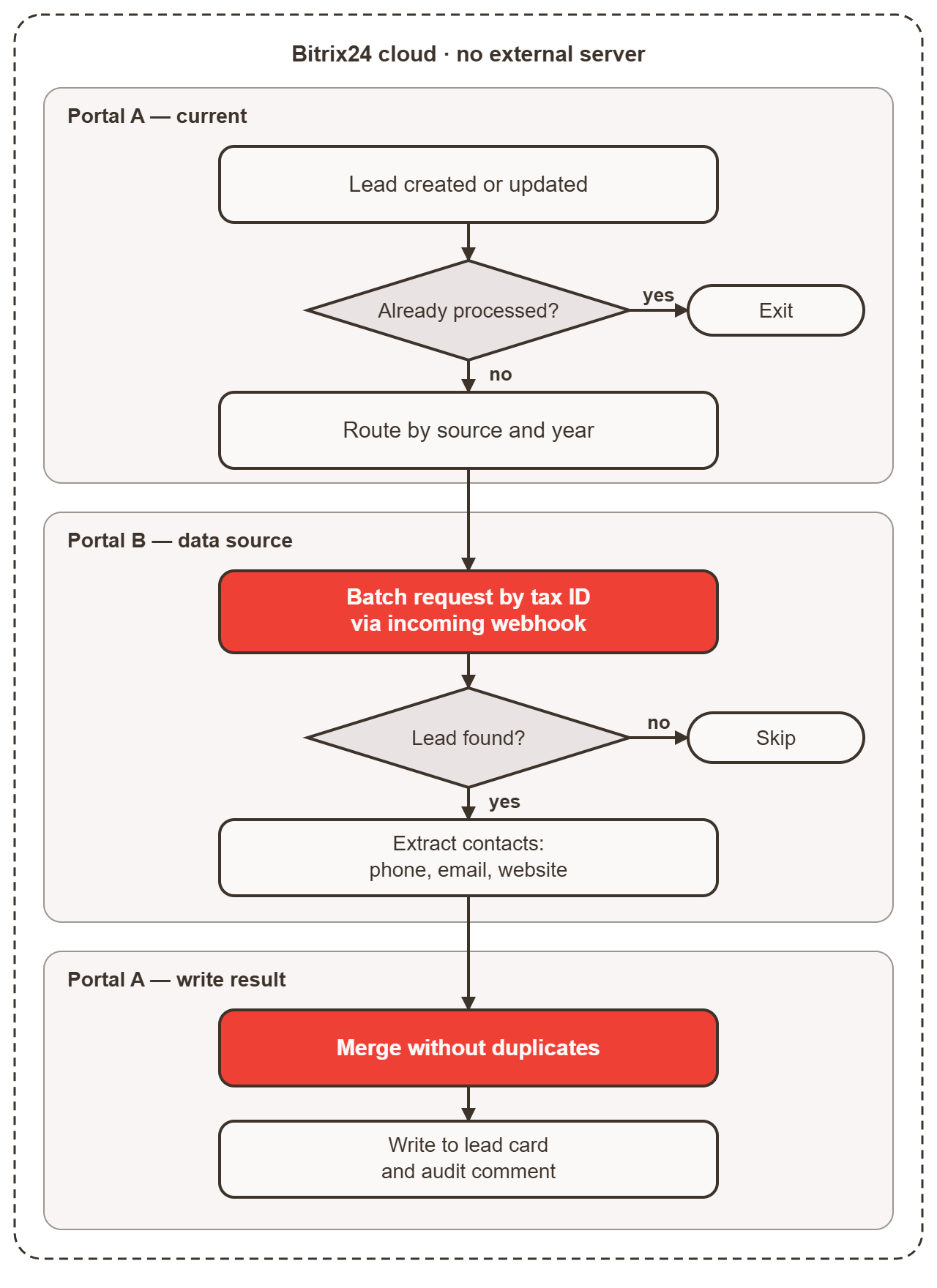
There’s no external server. All calls go directly between portals via the REST API using inbound webhooks. The interface launch is hosted in cloud Bitrix24 as well.
For more on how we connect services, see Development & Automation.
How it works
1. Routing by source and year. The process looks at the lead’s source and year. Leads from different years are searched for in different portals, where their historical data lives. Each option has its own branch in the process, and the log records where the request was sent.
2. Protection against re-runs. Before starting, the process checks the “Already run?” field. If the answer is yes, it doesn’t restart the search. This prevents infinite loops and repeated charges.
3. Collection and filtering. A separate check runs for every contact in the card (phone, email, website). An iterator goes through all the values of the field, and each one triggers its own search in the other portal. To avoid pulling unnecessary data, the request includes SELECT[0]=ID: we fetch only the ID, not the whole card.
4. Merging without duplicates. Each value found is compared with the current ones. If that phone or email is already there, it’s skipped. If not, it’s added. The found contact goes first, and the rest follow. The result is written in a single batch.
5. Audit. The lead’s comments record what data was in the card before processing and what was added from other portals. Managers and supervisors can see where every contact came from.
Technical challenges we had to solve
Double URL encoding in batch requests. A phone number with a “+” loses the plus sign when passed through a webhook and a nested batch request. We URL-encode values twice and pass ampersands in parameters as %26. Without this, phone numbers broke.
Excess data. A batch request without limits returns huge responses. Limiting fields with SELECT and using the halt flag significantly reduce response size and processing time.
Idempotency. The “Already run?” flag protects against repeated execution that could duplicate contacts.
Logging. Every step is written to the log via LogActivity. If something goes wrong, diagnosis takes minutes, not hours.
Results
- Manual transfer of contacts between portals has been replaced by an automated process.
- Duplicates in lead cards are kept to a minimum by comparing before writing.
- No external server: no VPS, maintenance, updates or separate perimeter security needed.
- Every change to a card can be explained: there’s a record in the comments.
What it means for your business
If you have several Bitrix24 portals, or your CRM data is scattered across different systems, we can build a similar setup, from scratch or on top of your existing processes, using Bitrix24 alone, with no extra infrastructure. Learn more on our Development & Automation page.